Andorid Q
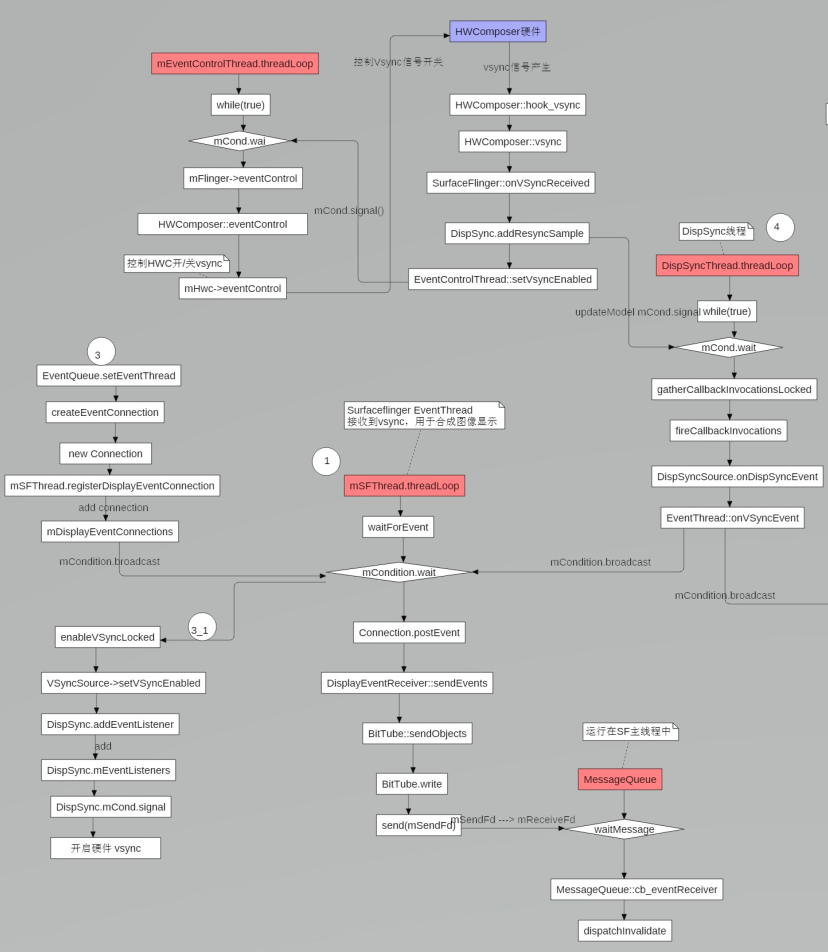
一. 前言 前面我们分析了SF EventThread接收到 sw vsync信号后的处理流程,以及SurfaceFlinger是如何通过DispSyncThread将HW Vsync转成sw vsync的流程。
一图以概之:
我们知道android app绘制是离不开编舞者 Choreographer 的,关于 Choreographer 这里就不赘叙,详细可以参考这篇博文。
二. App进程与AppEventThread建立通信过程 回忆一下,我们知道当应用进程的第一个具有布局的Activity启动时,会初始化Choreographer.
2.1 Choerographer初始化 Choerographer是个单例,意味着一个应用进程中只会存在一个实例化对象。
1 2 3 4 5 6 7 8 9 10 11 12 13 14 15 16 17 18 19 20 21 22 23 24 25 26 27 28 29 30 31 32 33 34 35 36 37 38 39 40 private static final ThreadLocal<Choreographer> sThreadInstance = new ThreadLocal <Choreographer>() { @Override protected Choreographer initialValue () { Looper looper = Looper.myLooper(); if (looper == null ) { throw new IllegalStateException ("The current thread must have a looper!" ); } Choreographer choreographer = new Choreographer (looper, VSYNC_SOURCE_APP); if (looper == Looper.getMainLooper()) { mMainInstance = choreographer; } return choreographer; } }; private Choreographer (Looper looper, int vsyncSource) { mLooper = looper; mHandler = new FrameHandler (looper); mDisplayEventReceiver = USE_VSYNC ? new FrameDisplayEventReceiver (looper, vsyncSource) : null ; mLastFrameTimeNanos = Long.MIN_VALUE; mFrameIntervalNanos = (long )(1000000000 / getRefreshRate()); mCallbackQueues = new CallbackQueue [CALLBACK_LAST + 1 ]; for (int i = 0 ; i <= CALLBACK_LAST; i++) { mCallbackQueues[i] = new CallbackQueue (); } setFPSDivisor(SystemProperties.getInt(ThreadedRenderer.DEBUG_FPS_DIVISOR, 1 )); }
2.2 FrameDisplayEventReceiver初始化 1 2 3 public FrameDisplayEventReceiver (Looper looper, int vsyncSource) { super (looper, vsyncSource); }
FrameDisplayEventReceiver类继承了DisplayEventReceiver类。
1 2 3 4 5 6 7 8 9 10 11 12 public DisplayEventReceiver (Looper looper, int vsyncSource) { if (looper == null ) { throw new IllegalArgumentException ("looper must not be null" ); } mMessageQueue = looper.getQueue(); mReceiverPtr = nativeInit(new WeakReference <DisplayEventReceiver>(this ), mMessageQueue, vsyncSource); mCloseGuard.open("dispose" ); }
这里注意FrameDisplayEventReceiver类是DisplayEventReceiver的子类。
2.3 android_view_DisplayEventReceiver.cpp:nativeInit 1 2 3 4 5 6 7 8 9 10 11 12 13 14 15 16 17 18 19 20 21 22 23 static jlong nativeInit (JNIEnv* env, jclass clazz, jobject receiverWeak, jobject messageQueueObj, jint vsyncSource) sp<MessageQueue> messageQueue = android_os_MessageQueue_getMessageQueue (env, messageQueueObj); if (messageQueue == NULL ) { jniThrowRuntimeException (env, "MessageQueue is not initialized." ); return 0 ; } sp<NativeDisplayEventReceiver> receiver = new NativeDisplayEventReceiver (env, receiverWeak, messageQueue, vsyncSource); status_t status = receiver->initialize (); if (status) { String8 message; message.appendFormat ("Failed to initialize display event receiver. status=%d" , status); jniThrowRuntimeException (env, message.string ()); return 0 ; } receiver->incStrong (gDisplayEventReceiverClassInfo.clazz); return reinterpret_cast <jlong>(receiver.get ()); }
2.4 NativeDisplayEventReceiver 初始化 1 2 3 4 5 6 7 8 9 10 NativeDisplayEventReceiver::NativeDisplayEventReceiver (JNIEnv* env, jobject receiverWeak, const sp<MessageQueue>& messageQueue, jint vsyncSource) : DisplayEventDispatcher (messageQueue->getLooper (), static_cast <ISurfaceComposer::VsyncSource>(vsyncSource)), mReceiverWeakGlobal (env->NewGlobalRef (receiverWeak)), mMessageQueue (messageQueue) { ALOGV ("receiver %p ~ Initializing display event receiver." , this ); }
NativeDisplayEventReceiver 继承了 DisplayEventDispatcher。
2.5 DisplayEventDispatcher 初始化 1 2 3 4 5 6 DisplayEventDispatcher::DisplayEventDispatcher (const sp<Looper>& looper, ISurfaceComposer::VsyncSource vsyncSource) : mLooper (looper), mReceiver (vsyncSource), mWaitingForVsync (false ) { ALOGV ("dispatcher %p ~ Initializing display event dispatcher." , this ); }
mReceiver是DisplayEventReceiver类型。
2.6 DisplayEventReceiver初始化 1 2 3 4 5 6 7 8 9 10 11 12 13 DisplayEventReceiver::DisplayEventReceiver (ISurfaceComposer::VsyncSource vsyncSource) { sp<ISurfaceComposer> sf (ComposerService::getComposerService()) ; if (sf != nullptr ) { mEventConnection = sf->createDisplayEventConnection (vsyncSource); if (mEventConnection != nullptr ) { mDataChannel = std::make_unique <gui::BitTube>(); mEventConnection->stealReceiveChannel (mDataChannel.get ()); } } }
之前的博文中也分析了,这里的ComposerService就是获取的SurfaceFlinger服务。
2.6.1 SurfaceFlinger.createDisplayEventConnection 进入SurfaceFlinger主线程。
1 2 3 4 5 6 7 8 9 10 11 12 sp<IDisplayEventConnection> SurfaceFlinger::createDisplayEventConnection ( ISurfaceComposer::VsyncSource vsyncSource) auto resyncCallback = mScheduler->makeResyncCallback ([this ] { Mutex::Autolock lock (mStateLock); return getVsyncPeriod (); }); const auto & handle = vsyncSource == eVsyncSourceSurfaceFlinger ? mSfConnectionHandle : mAppConnectionHandle; return mScheduler->createDisplayEventConnection (handle, std::move (resyncCallback)); }
2.6.2 Scheduler.cpp:createDisplayEventConnection 1 2 3 4 5 6 7 8 9 10 11 12 13 14 15 sp<IDisplayEventConnection> Scheduler::createDisplayEventConnection ( const sp<Scheduler::ConnectionHandle>& handle, ResyncCallback resyncCallback) RETURN_VALUE_IF_INVALID (nullptr ); return createConnectionInternal (mConnections[handle->id]->thread.get (), std::move (resyncCallback)); } sp<EventThreadConnection> Scheduler::createConnectionInternal (EventThread* eventThread, ResyncCallback&& resyncCallback) return eventThread->createEventConnection (std::move (resyncCallback)); }
这里mConnections[handle->id]->thread.get()拿到的是handle对应的EventThread.
2.6.3 EventThread.createEventConnection 1 2 3 4 5 6 7 8 9 10 sp<EventThreadConnection> EventThread::createEventConnection (ResyncCallback resyncCallback) const { return new EventThreadConnection (const_cast <EventThread*>(this ), std::move (resyncCallback)); } EventThreadConnection::EventThreadConnection (EventThread* eventThread, ResyncCallback resyncCallback) : resyncCallback (std::move (resyncCallback)), mEventThread (eventThread), mChannel (gui::BitTube::DefaultSize) {}
创建EventThreadConnection时新建了个BitTube管道,看来就是通信枢纽就是这个了。
注意到这个类有onFirstRef方法,在生成对象后,就会调用。
2.6.4 EventThreadConnection.onFirstRef 1 2 3 4 void EventThreadConnection::onFirstRef () mEventThread->registerDisplayEventConnection (this ); }
2.6.5 EventThread.registerDisplayEventConnection 1 2 3 4 5 6 7 8 9 10 11 12 13 14 15 16 status_t EventThread::registerDisplayEventConnection (const sp<EventThreadConnection>& connection) std::lock_guard<std::mutex> lock (mMutex) ; auto it = std::find (mDisplayEventConnections.cbegin (), mDisplayEventConnections.cend (), connection); if (it != mDisplayEventConnections.cend ()) { ALOGW ("DisplayEventConnection %p already exists" , connection.get ()); mCondition.notify_all (); return ALREADY_EXISTS; } mDisplayEventConnections.push_back (connection); mCondition.notify_all (); return NO_ERROR; }
现在注意到我们仅仅是得到了一个BitTube,然而并没有用上这个管道。
2.7 EventThreadConnection.stealReceiveChannel 1 2 3 4 status_t EventThreadConnection::stealReceiveChannel (gui::BitTube* outChannel) outChannel->setReceiveFd (mChannel.moveReceiveFd ()); return NO_ERROR; }
将新建的BitTube的Fd复制给outChannel, 也就是DisplayEventReceiver中的 mDataChannel.
2.8 BitTube信道连接过程 2.8.1 DisplayEventDispatcher.initialize 1 2 3 4 5 6 7 8 9 10 11 12 13 14 15 16 17 status_t DisplayEventDispatcher::initialize () status_t result = mReceiver.initCheck (); if (result) { ALOGW ("Failed to initialize display event receiver, status=%d" , result); return result; } int rc = mLooper->addFd (mReceiver.getFd (), 0 , Looper::EVENT_INPUT, this , NULL ); if (rc < 0 ) { return UNKNOWN_ERROR; } return OK; }
注意这个DisplayEventDispatcher是继承了LooperCallback, 所以这里的this方法就是handleEvent。
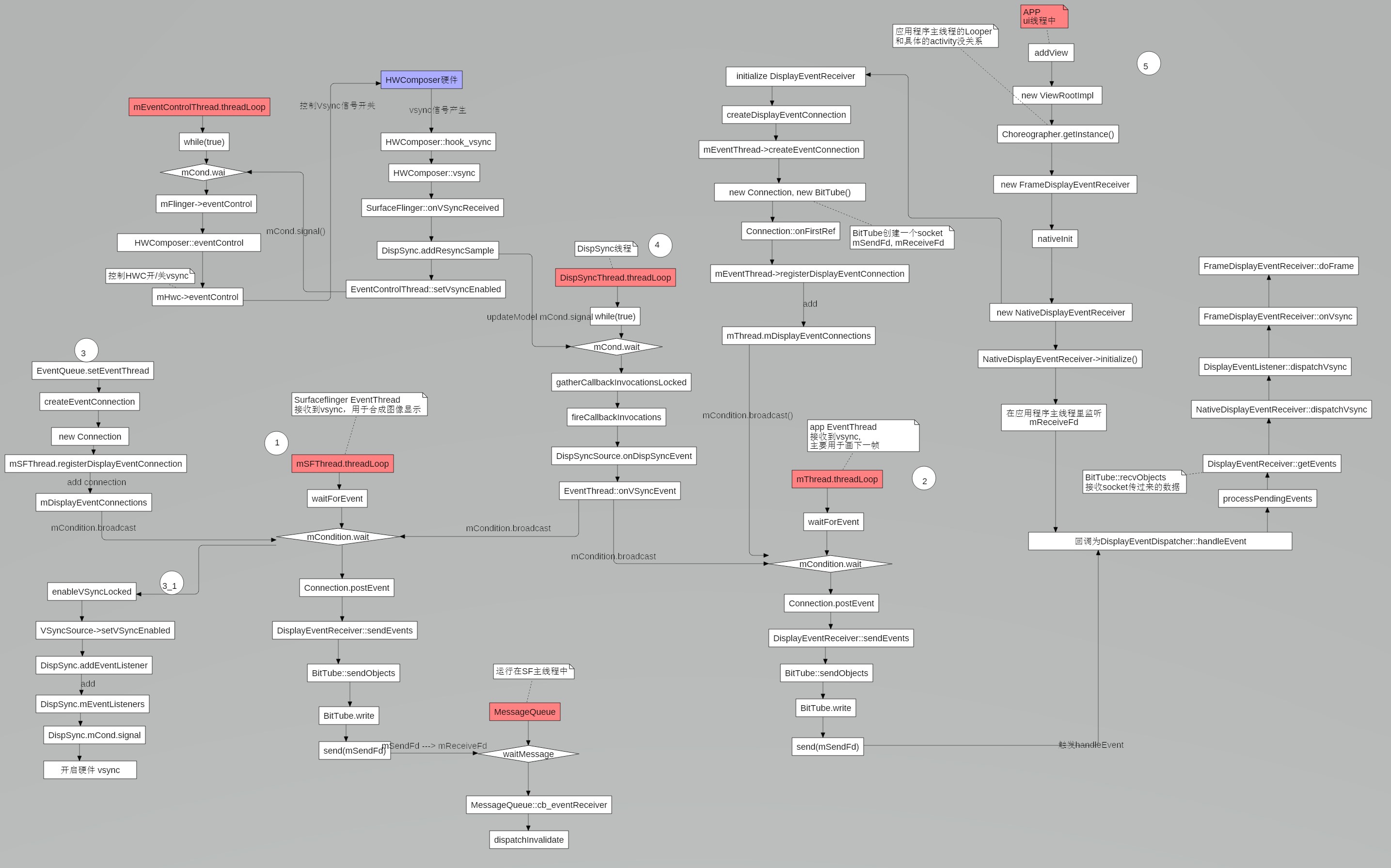
到这里这里整个Vsync流程已经跑通:
SurfaceFlinger主线程收到硬件Vsync, 经过误差修正, 通知给DispSyncThread线程
DispSyncThread线程计算各个EventThread的SW Vsync信号时间并及时发出
AppEventThread收到sw Vsync信号,遍历各个Connection,调用sendEvent向对应BitTube管道发送事件
App进程的主线程收到事件,并处理
接下来我们就看app收到sw vsync信号的处理过程。
三. App进程收到SW VSYNC信号 3.1 DisplayEventDispatcher.handleEvent 1 2 3 4 5 6 7 8 9 10 11 12 13 14 int DisplayEventDispatcher::handleEvent (int , int events, void *) ...... nsecs_t vsyncTimestamp; PhysicalDisplayId vsyncDisplayId; uint32_t vsyncCount; if (processPendingEvents (&vsyncTimestamp, &vsyncDisplayId, &vsyncCount)) { mWaitingForVsync = false ; dispatchVsync (vsyncTimestamp, vsyncDisplayId, vsyncCount); } return 1 ; }
3.1.1 DisplayEventDispatcher.processPendingEvents 1 2 3 4 5 6 7 8 9 10 11 12 13 14 15 16 17 18 19 20 21 22 23 24 25 26 27 28 29 30 31 32 33 34 35 bool DisplayEventDispatcher::processPendingEvents ( nsecs_t * outTimestamp, PhysicalDisplayId* outDisplayId, uint32_t * outCount) bool gotVsync = false ; DisplayEventReceiver::Event buf[EVENT_BUFFER_SIZE]; ssize_t n; while ((n = mReceiver.getEvents (buf, EVENT_BUFFER_SIZE)) > 0 ) { ALOGV ("dispatcher %p ~ Read %d events." , this , int (n)); for (ssize_t i = 0 ; i < n; i++) { const DisplayEventReceiver::Event& ev = buf[i]; switch (ev.header.type) { case DisplayEventReceiver::DISPLAY_EVENT_VSYNC: gotVsync = true ; *outTimestamp = ev.header.timestamp; *outDisplayId = ev.header.displayId; *outCount = ev.vsync.count; break ; case DisplayEventReceiver::DISPLAY_EVENT_HOTPLUG: dispatchHotplug (ev.header.timestamp, ev.header.displayId, ev.hotplug.connected); break ; case DisplayEventReceiver::DISPLAY_EVENT_CONFIG_CHANGED: dispatchConfigChanged (ev.header.timestamp, ev.header.displayId, ev.config.configId); break ; default : ALOGW ("dispatcher %p ~ ignoring unknown event type %#x" , this , ev.header.type); break ; } } } if (n < 0 ) { ALOGW ("Failed to get events from display event dispatcher, status=%d" , status_t (n)); } return gotVsync; }
3.2 NativeDisplayEventReceiver.dispatchVsync 1 2 3 4 5 6 7 8 9 10 11 12 13 14 void NativeDisplayEventReceiver::dispatchVsync (nsecs_t timestamp, PhysicalDisplayId displayId, uint32_t count) JNIEnv* env = AndroidRuntime::getJNIEnv (); ScopedLocalRef<jobject> receiverObj (env, jniGetReferent(env, mReceiverWeakGlobal)) ; if (receiverObj.get ()) { ALOGV ("receiver %p ~ Invoking vsync handler." , this ); env->CallVoidMethod (receiverObj.get (), gDisplayEventReceiverClassInfo.dispatchVsync, timestamp, displayId, count); ALOGV ("receiver %p ~ Returned from vsync handler." , this ); } mMessageQueue->raiseAndClearException (env, "dispatchVsync" ); }
通过JNI回调到java层的DisplayEventReceiver.dispatchVsync方法
3.3 DisplayEventReceiver.dispatchVsync 1 2 3 4 5 6 @SuppressWarnings("unused") @UnsupportedAppUsage private void dispatchVsync (long timestampNanos, long physicalDisplayId, int frame) { onVsync(timestampNanos, physicalDisplayId, frame); }
参考2.2中,这里的DisplayEventReceiver 对象就是其子类FrameDisplayEventReceiver的对象。
3.4 FrameDisplayEventReceiver.onVsync 1 2 3 4 5 6 7 8 9 10 11 12 13 14 15 16 17 18 19 20 21 22 23 24 25 26 27 28 29 30 31 32 33 34 35 36 37 @Override public void onVsync (long timestampNanos, long physicalDisplayId, int frame) { long now = System.nanoTime(); if (timestampNanos > now) { Log.w(TAG, "Frame time is " + ((timestampNanos - now) * 0.000001f ) + " ms in the future! Check that graphics HAL is generating vsync " + "timestamps using the correct timebase." ); timestampNanos = now; } if (mHavePendingVsync) { Log.w(TAG, "Already have a pending vsync event. There should only be " + "one at a time." ); } else { mHavePendingVsync = true ; } mTimestampNanos = timestampNanos; mFrame = frame; Message msg = Message.obtain(mHandler, this ); msg.setAsynchronous(true ); mHandler.sendMessageAtTime(msg, timestampNanos / TimeUtils.NANOS_PER_MS); } @Override public void run () { mHavePendingVsync = false ; doFrame(mTimestampNanos, mFrame); }
完整的VSYNC流程图如下:
参考资料
Android SurfaceFlinger SW Vsync模型 DispSync DispSync详解